

Embed your status page and export its data
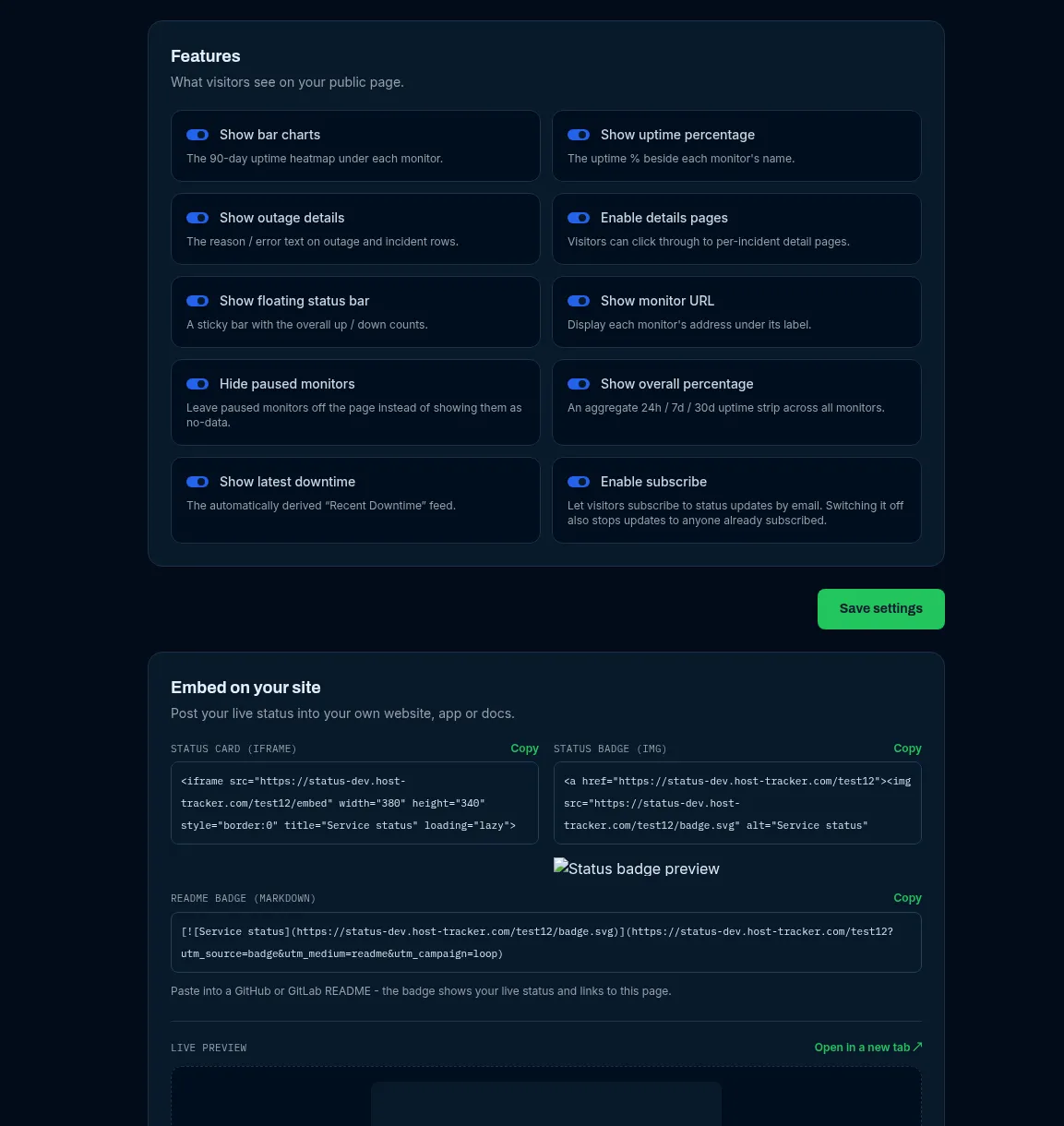
Besides the full public page, every status page publishes smaller surfaces you can embed elsewhere or read from code: an iframe status card, an SVG badge, a machine-readable status.json, RSS/Atom feeds and an SLA export. None of them need a token. The Embed on your site block at the bottom of the page’s Settings tab gives copy-ready snippets with a live preview; the header’s Share button has the same snippets.
Public addresses
Section titled “Public addresses”Every path below works under both page addresses - https://status.host-tracker.com/<slug> and
https://www.host-tracker.com/status/<slug>:
| Path | What it is | Needs |
|---|---|---|
/ (the page) |
The full public page | - |
/embed |
Compact status card for an iframe | no password |
/badge.svg |
Live status badge | no password |
/status.json |
Machine-readable status | no password |
/sla-export.json |
12-month SLA history | an SLA target, Webmaster band or above, no password |
/feed.xml, /feed.atom |
RSS 2.0 and Atom 1.0 feeds of announcements | Enable subscribe on, no password |
/history?page=N |
Past incidents, grouped by month, 20 per page | Enable details pages on |
/incidents/{incidentId} |
One declared incident with its timeline | Enable details pages on |
/service/{componentId} |
One component’s detail page | Service pages on |
Anonymous requests are limited to 60 per minute per IP address.
Embed a status card
Section titled “Embed a status card”<iframe src="https://status.host-tracker.com/<slug>/embed" width="380" height="340" style="border:0" title="Service status" loading="lazy"></iframe>The card shows the page’s overall state and components, refreshes itself every 60 seconds and may be framed by any site. Copy it from Settings -> Embed on your site -> Status card (iframe).
Status badge
Section titled “Status badge”A small SVG pill with the overall state, for a website, docs or support portal:
<a href="https://status.host-tracker.com/<slug>"><img src="https://status.host-tracker.com/<slug>/badge.svg" alt="Service status" height="20"></a>For a GitHub or GitLab README (README badge (Markdown)):
[](https://status.host-tracker.com/<slug>)The badge text is one of: operational, degraded, partial outage, major outage, under maintenance,
monitors paused, no components. It is cached for 60 seconds.
status.json
Section titled “status.json”A summary in a shape similar to other status-page providers, cached for 60 seconds:
{ "page": { "name": "Acme status", "url": "https://.../status/acme", "updatedAt": "..." }, "status": { "indicator": "none", "description": "All Systems Operational" }, "components": [ { "id": "...", "name": "Website", "group": "Web", "thirdParty": false, "status": "operational", "state": "up", "lastCheckedAt": "...", "uptime24h": 100, "uptime7d": 99.98, "uptime30d": 99.95, "uptime90d": 99.97 } ], "incidents": [ { "id": "...", "title": "...", "status": "Investigating", "impact": "Major", "createdAt": "...", "affectedComponents": ["Website"] } ], "scheduledMaintenances": [ { "id": "...", "title": "...", "status": "...", "scheduledStart": "...", "scheduledEnd": "..." } ], "unconfirmedCount": 0, "overallUptime90d": 99.96}status.indicatorisnone(operational),minor(degraded or partial outage),major(major outage) ormaintenance.descriptionis the page headline.components[].statusisoperational,degraded,downorunknown;components[].stateis one ofup,down,degraded,stale(no recent result),maint(down inside a maintenance window) orpaused.incidentslists open declared incidents;scheduledMaintenanceslists declared maintenance plus upcoming and in-progress maintenance windows.- The JSON follows your display switches: per-row uptime appears only when Uptime % on every row is on,
overallUptime90donly when the overall uptime strip is on, and paused components are left out when Hide paused monitors is on. Members are added over time but never removed or renamed.
RSS and Atom feeds
Section titled “RSS and Atom feeds”/feed.xml (RSS 2.0) and /feed.atom (Atom 1.0) carry your declared incidents and their updates, so people can
follow the page in a feed reader. They exist only while Enable subscribe is on.
SLA export
Section titled “SLA export”/sla-export.json returns the page’s SLA target and 12 monthly figures - the same history visitors can expand on the
page and download as CSV:
{ "slaTarget": 99.9, "months": [ { "month": "2026-09", "uptimePercent": 99.97, "withinTarget": true } ] }It is available when the page has an SLA target set and the plan is in the Webmaster band or above; it is cached for 15 minutes. See Uptime percentage and SLA.
Password-protected pages
Section titled “Password-protected pages”While a page has a password, the embed card, the badge, status.json, the SLA export and
the feeds all answer 404, and the editor hides the embed snippets - an embed on another site would otherwise bypass
the password.