

Set up a webhook alert contact
A webhook contact posts the alert to a URL you control, as JSON, so you can feed it into your own system,
automation or bot. Under the hood this is a plain http contact with no gateway value - see
Slack, Teams and the other gateway-recognized flavors if
you’re integrating with one of those services instead of your own endpoint.
Settings reference
Section titled “Settings reference”| Setting (UI label) | API field (v2) | Type / allowed values | Default | Plan limits | What it does for you |
|---|---|---|---|---|---|
| Contact Type | type |
"http" |
- | - | |
| Webhook URL | address |
Any URL your endpoint listens on | - (required) | - | Where the alert is POSTed |
| Request format | mimeType |
application/json (default), application/x-www-form-urlencoded, text/xml; text/html/text/plain once a custom template exists |
application/json |
- | The outgoing request’s Content-Type and body encoding |
| HTTP headers | httpHeaders |
Array of {header, value} |
Empty | - | Custom headers sent with every request (an Authorization token, a shared secret, a routing header) |
| Group events | groupedAlerts |
boolean | false |
- | Combine simultaneous alerts into one request instead of one each - see below and grouped alerts |
| Custom templates | templates |
Array of {event, content}, event = up/down/repeatedlyDown |
Empty (uses the built-in payload) | - | Author the exact body HostTracker sends per event, with [[token]] placeholders |
Set it up in the app
Section titled “Set it up in the app”- Open Alerts & Contacts and click + Add contact.
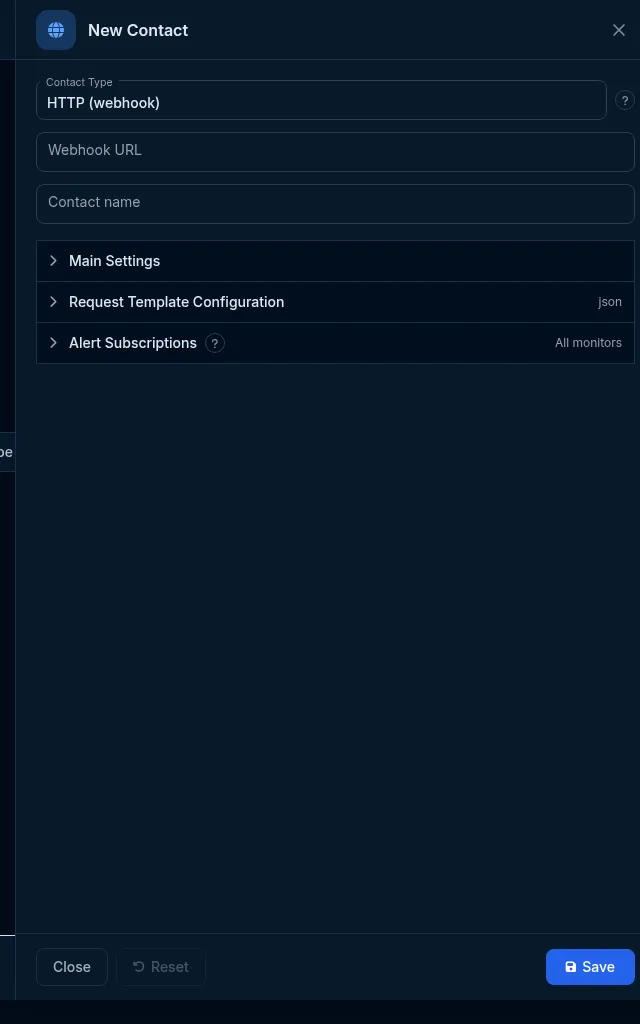
- Choose HTTP (webhook) in the Contact Type list.
- Enter the Webhook URL that should receive the alert, and give the contact a name.
Request Template Configuration
Section titled “Request Template Configuration”Expand Request Template Configuration to shape the outgoing request:
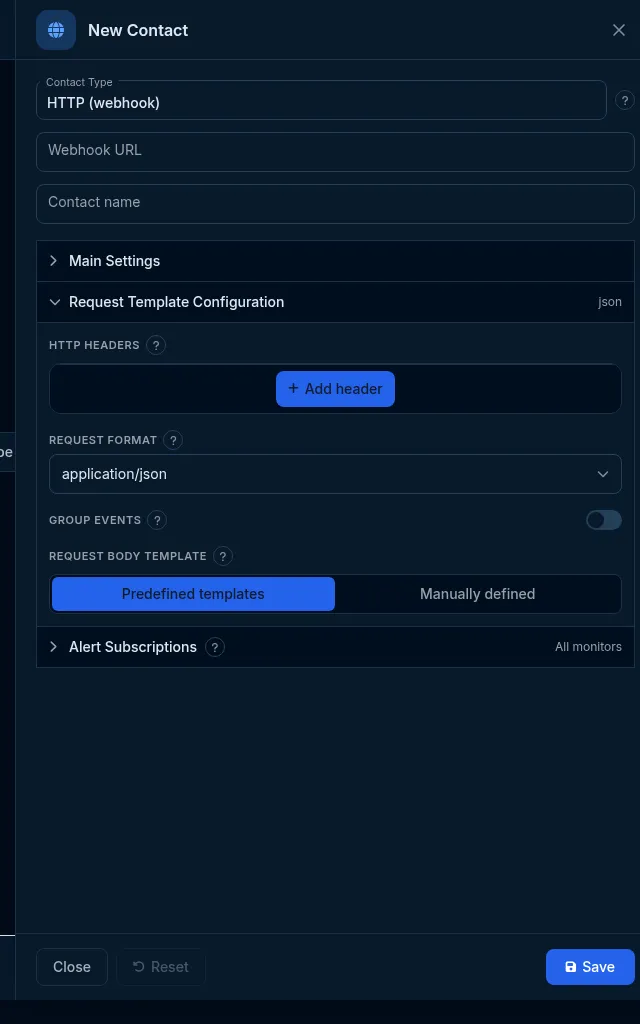
- HTTP headers - add custom request headers. Click Add header for each.
- Request format - the body’s content type,
application/jsonby default. - Group events - when on, several alerts that fire together are delivered as one combined request (a JSON array of events) instead of one request each - see grouped alerts.
- Request body template - either Predefined templates (ready-made payload shapes) or Manually
defined, where you write the JSON yourself with
[[token]]placeholders that HostTracker fills at send time.
What the message looks like, and the template variables
Section titled “What the message looks like, and the template variables”Without a custom template, HostTracker posts its own built-in JSON payload describing the event. With a custom
template, you write the exact body - one template per event type (Up/Down/RepeatedlyDown) - and drop in
variables like [[taskName]], [[taskUrl]], [[error]], [[downtimeFormated]] or [[failedLocations]]
anywhere in the text. A variable with no value for that event resolves to an empty string rather than leaking
the literal token, and values are escaped for whichever mimeType you chose (JSON string escaping for
application/json, URL-encoding for the form-urlencoded type, and so on).
Example Down template:
{"event":"down","site":"[[taskName]]","url":"[[taskUrl]]","error":"[[error]]","code":"[[errorcodename]]","details":"[[currentCheckDetailsLink]]"}Custom-template requests are always sent individually - grouping never combines them, since the point of a custom template is to describe exactly one event’s shape.
The most commonly used variables (availability: U = Up, D = Down, R = RepeatedlyDown):
| Variable | U | D | R | Meaning |
|---|---|---|---|---|
[[taskName]] |
Yes | Yes | Yes | Name of the monitor |
[[taskUrl]] |
Yes | Yes | Yes | The monitored URL/host |
[[taskEditLink]] |
Yes | Yes | Yes | Link to edit the monitor in HostTracker |
[[eventUrl]] |
Yes | Yes | Yes | Link to the event/incident details |
[[timeOfSend]] |
Yes | Yes | Yes | When the notification was sent (your profile’s date/time format) |
[[error]] |
Yes | Yes | Yes | Last error message |
[[errorcodename]] |
Yes | Yes | Yes | Short stable error code (e.g. ConnectTimeout, Http503) |
[[firstErrorTime]] |
Yes | Yes | When the outage started | |
[[downtimeInSeconds]] |
Yes | Yes | Yes | Downtime in seconds since the first failed check |
[[downtimeFormated]] |
Yes | Yes | Yes | Human-formatted downtime (e.g. “1 hour 24 minutes”) |
[[failedLocations]] |
Yes | Yes | Locations that failed during the state-change recheck | |
[[failedLocationsCount]] / [[okLocationsCount]] / [[totalLocationsCount]] |
Yes | Yes | Recheck location counts |
A further set covers certificate-monitoring events ([[certExpirationDateUtc]], [[certDaysToExpiration]],
[[certEvents]]) and registry-blacklist events ([[rknBlocks[0].case]] and siblings) - these resolve to an
empty string on every other event type.
Do it with the API or MCP
Section titled “Do it with the API or MCP”POST /contact{ "type": "http", "address": "https://example.com/hooks/hosttracker", "name": "My webhook" }With headers and a custom Down template:
PATCH /contact/{id}{ "httpHeaders": [ { "header": "Authorization", "value": "Bearer <token>" } ], "templates": [ { "event": "down", "content": "{\"site\":\"[[taskName]]\",\"error\":\"[[error]]\"}" } ]}The create_contact MCP tool deliberately excludes http - use api_request with the body above for the
contact-based webhook covered on this page. For the separate, signed webhook resource with typed events
and delivery logs, use create_webhook instead (see below).
What happens next
Section titled “What happens next”An http contact is born confirmed - there’s nothing to verify out-of-band, since a real delivery to the URL
is itself the proof. Send a test to confirm your endpoint receives and accepts it.
Limits and gotchas
Section titled “Limits and gotchas”- A contact-based webhook is unsigned (legacy) - if you need to verify the request came from HostTracker, use the signed v2 webhooks instead.
- Slack, Teams, PagerDuty, Opsgenie, Pushover, Pushbullet and Mattermost webhook URLs/keys are recognized as their own channel types (with rich formatting) rather than a generic webhook - see their own setup pages if that’s what you’re connecting.
- A malformed
httpHeaders/templatesentry (missingheaderorevent) is refused with422, not silently dropped. - A plain webhook (no recognized gateway) does not receive certificate-expiry, domain-expiry, DNSBL
blacklist or Web Risk notices - those four check-specific alert kinds are only delivered to email, SMS,
voice, chat/bot channels, or an
httpcontact whosegatewayis one of the seven recognized ones (Slack, Teams, PagerDuty, Opsgenie, Pushover, Pushbullet, Mattermost). Ordinary monitor Down/Up/RepeatedlyDown alerts are unaffected by this and reach a plain webhook normally. If you need those specific notices on your own endpoint, subscribe an email contact to them as well, or route through one of the recognized gateways.