

Monitor a TCP port (Port monitor)
The Port monitor (API type port, shown in the app as TCP Port check) opens a TCP connection to
host:port and confirms the service accepts it. It can also wrap the connection in TLS and require the data
the service sends to match a pattern. Use it for SMTP, IMAP, FTP, SSH, database listeners, game servers -
anything that listens on a TCP port but is not a website.
At a glance
Section titled “At a glance”| API type token | port |
| Runs from | HostTracker’s public checkpoint fleet - you pick the locations |
| Intervals in the app | 1 minute to 24 hours, or a cron schedule |
| Default interval | 3 minutes |
| Plan gates | none for the type; TLS policies, public/custom DNS and the attached DNSBL are package features |
How Down is decided
Section titled “How Down is decided”- DNS resolves the host (with your DNS options and expected IPs, if set).
- The TCP connection opens within 10 seconds (fixed - there is no timeout setting).
- With Connect over TLS/SSL on, the TLS handshake completes. An expired certificate always fails; the TLS policy switches add stricter rules.
- With a Response Pattern set, the check reads what the service sends until the service closes the connection or 1 MB arrives, and that text must match the pattern. The read shares the 10-second budget.
A failure is re-checked from other locations before the monitor turns Down - see How down detection works.
Settings reference
Section titled “Settings reference”The name, interval, cron, tags, Full Log, Open Stats, subscriptions and locations work as described in Common monitor fields.
| Setting (app label) | API field | Type / allowed values | Default | Plan limits | What it does for you |
|---|---|---|---|---|---|
| Url / Domain / IP | url |
host:port (IPv6 as [addr]:port) |
required | - | What to connect to. Always include the port - without one, port 80 is used. |
| Attached monitors - DNSBL | settings.attached.dnsbl |
true / false / {"enabled": bool} |
off | attached-check entitlement | Blacklist lookup of this host every 12 hours. The only sub-check a Port monitor can carry. |
| Connect over TLS/SSL (Request Configuration; summary Plain TCP / TLS/SSL) | settings.ssl |
boolean | false |
- | Performs a TLS handshake after connecting - for implicit-TLS ports such as 443, 465, 993, 995. |
| DNS Server Selection | settings.publicDns (integer, 0 = off) or settings.dns (up to 4 resolver IPs) |
Default DNS servers at locations, Public DNS servers of location’s country, Manually defined DNS servers | default resolvers | public DNS and custom DNS are separate package features | Which resolvers look up the host. |
| Excluded public DNS server IPs | settings.expectedDns |
up to 10 IPs | none | public DNS feature | Public resolvers to skip. The API name is historical; the agent treats these as excluded. |
| Response Pattern (Response Validation) | settings.pattern |
regular expression, up to 1023 characters, case-sensitive | empty = judge the connection only | - | The data the service sends must match. Only for services that send their data and then close the connection - see Limits and gotchas. |
| TLS Handshake switches (shown when TLS is on) | settings.requireValidChain, settings.requireStrongTls, settings.blockWeakCiphers, settings.checkRevocation |
booleans | all false |
SSL policy feature; revocation also needs its own feature | Same rules as the Website monitor; applied only while ssl is on. |
| Expected IPs Validation | settings.expectedIps |
up to 10 IPv4/IPv6 addresses | none | - | Fails when the host resolves to any other address. |
| (API only) Certificate watch days | settings.certWatchDays |
up to 8 whole numbers, 1-3650 | none | - | With TLS on, sends an expiry reminder when the certificate has exactly this many days left. |
| Recheck strategy, If selected locations are unavailable | recheck, locations.fallback |
as on the Website monitor | majority vote, starve |
- | How failures are confirmed and what happens when your locations are busy. |
Set it up in the app
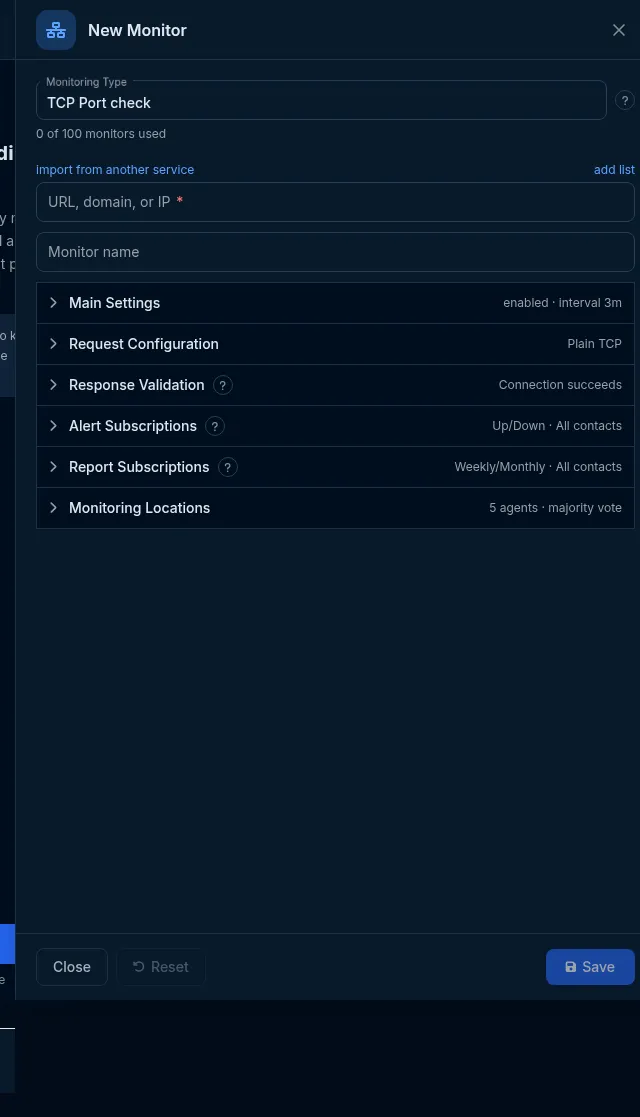
Section titled “Set it up in the app”- On the Sites dashboard, click Add Monitor and choose TCP Port check in Monitoring Type.
- Enter
host:portin Url / Domain / IP (for examplemail.example.com:25) and a name. - In Request Configuration, switch on Connect over TLS/SSL for an implicit-TLS port.
- In Response Validation, optionally set a Response Pattern and, with TLS on, the TLS policy switches.
- Pick locations in Monitoring Locations and click Save.
Do it with the API or MCP
Section titled “Do it with the API or MCP”curl -X POST https://api2.host-tracker.com/monitor \ -H "Authorization: Bearer $HT_TOKEN" -H "Content-Type: application/json" \ -d '{ "type": "port", "url": "mail.example.com:25", "name": "SMTP", "interval": 180, "locations": { "pools": ["allworld"] } }'Update - move to the implicit-TLS port and require a valid certificate chain:
curl -X PATCH https://api2.host-tracker.com/monitor/<monitor-id> \ -H "Authorization: Bearer $HT_TOKEN" -H "Content-Type: application/json" \ -d '{ "url": "mail.example.com:465", "settings": { "ssl": true, "requireValidChain": true } }'MCP (interval is passed to the API as-is, in seconds):
create_monitor(type="port", url="mail.example.com:25", name="SMTP", interval=180, pools="allworld")update_monitor(id="<monitor-id>", settingsJson="{\"ssl\":true}")Recipes
Section titled “Recipes”- SMTP, SSH, FTP, Redis or PostgreSQL is accepting connections -
host:portwith no pattern. - IMAPS or SMTPS with a valid certificate -
host:993orhost:465,ssl: true,requireValidChain: true. - A service that answers and hangs up (for example a status port that prints
OKand closes) - pattern^OK. - Certificate expiry on a mail port -
ssl: truepluscertWatchDays: [30, 7, 1], or a standalone certificate expiry monitor onhost:port.
What happens next
Section titled “What happens next”Each check records the connection (and TLS) time. A failed connection, handshake or pattern is re-checked from other locations, then opens an incident and alerts the subscribed contacts.
Limits and gotchas
Section titled “Limits and gotchas”- A pattern waits for the service to close the connection. Services that send a greeting and then wait for a command (SMTP, FTP, SSH, IMAP) keep it open, so the read runs into the 10-second timeout and the check fails. Services that wait for the client to speak first (HTTP, most databases) send nothing at all. Leave the pattern empty for these and rely on the connection (and TLS) result.
- There is no UDP mode and no timeout setting; the connect timeout is 10 seconds.
locations.poolsis required when creating a Port monitor through the API.422 invalid_settings- a pattern over 1023 characters or an unknown member.