

Attach sub-checks to a monitor
Instead of creating separate monitors, you can switch on attached monitors (sub-checks) inside a Website, API, Ping or Port monitor. The parent monitor then also watches its certificate, its domain registration, its blacklist status and its Google Web Risk verdict, and alerts through the parent’s own contacts. This is how most accounts use these checks.
What can attach to what
Section titled “What can attach to what”| Sub-check (app label) | API field | Website (http) |
API (api) |
Ping / Port | Package feature |
|---|---|---|---|---|---|
| DNSBL | attached.dnsbl |
yes | - | yes | attached DNSBL |
| Domain Expiration | attached.domainExp |
yes | yes | - | attached domain expiry |
| Certificate Expiration | attached.sslExp |
yes | yes | - | attached certificate expiry |
| Web Risk | attached.webRisk |
yes | yes | - | Web Risk |
| Indexability | attached.indexability |
yes (only if your package includes it) | - | - | Indexability |
Each is off by default. A monitor whose own type is DNSBL, Domain expiry, Certificate expiry or Web Risk cannot
carry attachments (422).
How attached checks run
Section titled “How attached checks run”- Every 12 hours, fixed. DNSBL, Domain Expiration, Web Risk and Certificate Expiration run on one shared
12-hour schedule. A newly attached check gets its first run at a random moment within its first 12 hours, so
the first result can take that long. The interval is not configurable - the Web Risk
intervalfield is accepted but does not change it. - One lookup per address. When several of your monitors point at the same host (or domain), they share one lookup.
- Certificate Expiration reads the certificate your monitor’s own checks already see on the monitor’s host and port (443 by default); it only makes a separate TLS connection when no recent observation exists.
- Indexability is different: it is evaluated on every check of the parent monitor, from the page the check already downloaded.
What each one reports
Section titled “What each one reports”| Sub-check | Goes Down (alert) when | Informational reminders |
|---|---|---|
| Certificate Expiration | the certificate is expired or invalid | when exactly 30, 7 or 1 day is left (or the parent’s certWatchDays); also when the certificate is replaced |
| Domain Expiration | the domain has expired or is not registered | when exactly 30, 7 or 1 day is left; also when the expiration date changes (a renewal) |
| DNSBL | the host is listed on at least 2 blacklists (a single listing only shows in the status) | - |
| Web Risk | Google lists the URL as phishing, malware or unwanted software | - |
| Indexability | never | when noindex/nofollow appears or disappears, or the canonical URL changes |
Who is notified:
- A bad state (Down) goes to the parent’s contacts subscribed to Down and still-down reminders.
- Reminders and Indexability changes go to the parent’s contacts subscribed to Up.
- Attached-check notifications go to email, SMS and messenger contacts only - not to voice-call or webhook (HTTP) contacts.
- A maintenance window silences only certificate alerts; blacklist, domain and Web Risk alerts still go out.
Set it up in the app
Section titled “Set it up in the app”- Open the monitor from the Sites dashboard (or click Add Monitor).
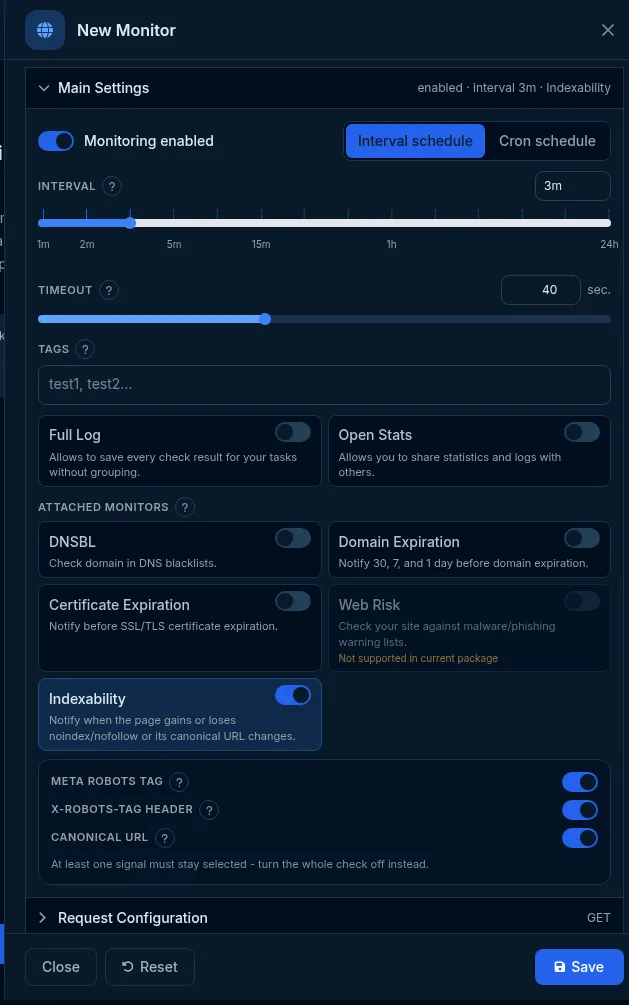
- In Main Settings, find Attached monitors and switch on the ones you want. A switch that your package does not include is disabled with Not supported in current package.
- For Indexability, choose the signals: Meta robots tag, X-Robots-Tag header, Canonical URL (at least one must stay on).
- Click Save.
Do it with the API or MCP
Section titled “Do it with the API or MCP”Send the flags inside settings.attached, or at the top level as attached. Each accepts true, false or
{"enabled": true|false}; a PATCH changes only the flags you name.
curl -X PATCH https://api2.host-tracker.com/monitor/<monitor-id> \ -H "Authorization: Bearer $HT_TOKEN" -H "Content-Type: application/json" \ -d '{ "attached": { "sslExp": true, "domainExp": true, "dnsbl": true } }'Indexability with only two signals:
{ "settings": { "attached": { "indexability": { "metaRobots": true, "robotsHeader": true, "canonical": false } } } }Read the results with GET /monitor/{monitorId}/attached (or GET /monitor/{id}?expand=attached). It returns a
block per sub-check: DNSBL listings[] with name, weight, removalUrl, muted; certificate notAfter,
notBefore, daysLeft; domain expiresAt, daysLeft, domain; Web Risk verdict, threats; each with
checkedAt.
Mute a DNSBL listing you consider harmless (it then no longer counts toward Down):
curl -X POST https://api2.host-tracker.com/monitor/<monitor-id>/attached/dnsbl/mute \ -H "Authorization: Bearer $HT_TOKEN" -H "Content-Type: application/json" \ -d '{ "listings": ["<blacklist name>"], "muted": true }'MCP: update_monitor(id="<monitor-id>", settingsJson="{\"attached\":{\"sslExp\":true}}"), and
get_monitor(id="<monitor-id>", expand="attached") to read results.
When a standalone monitor makes more sense
Section titled “When a standalone monitor makes more sense”Create a standalone Certificate expiry, Domain expiry, DNSBL or Web Risk monitor when the address has no other monitor, when you need DNSBL’s scope option (all IPs, or mail servers), or when a single blacklist listing should already alert you. Standalone checks run every 6 hours (Web Risk every 12 hours).
Limits and gotchas
Section titled “Limits and gotchas”403 package_limit(featureattachedCheck.<Name>) - turning on a sub-check your package does not include. Turning one off is never refused, and one that is already on keeps working after a plan change.- Indexability with every signal off is refused; turn the attachment off instead.
- On API monitors the DNSBL attachment is not stored - use a standalone DNSBL monitor for an API host.