

Test a contact
Before you trust a contact to wake you up for a real outage, send it a test alert. It goes through the same delivery pipeline a genuine Down or Up alert would (the account’s real alert-sending path, not a mock), so a successful test is a real confirmation, not a fake ping.
Settings reference
Section titled “Settings reference”| Setting | API field (v2) | Type / allowed values | Default | Plan limits | What it does for you |
|---|---|---|---|---|---|
| Which alert to simulate | alertType (request body) |
up, down or repeatedlyDown |
up |
- | Renders the test using that event’s message template |
Send a test in the app
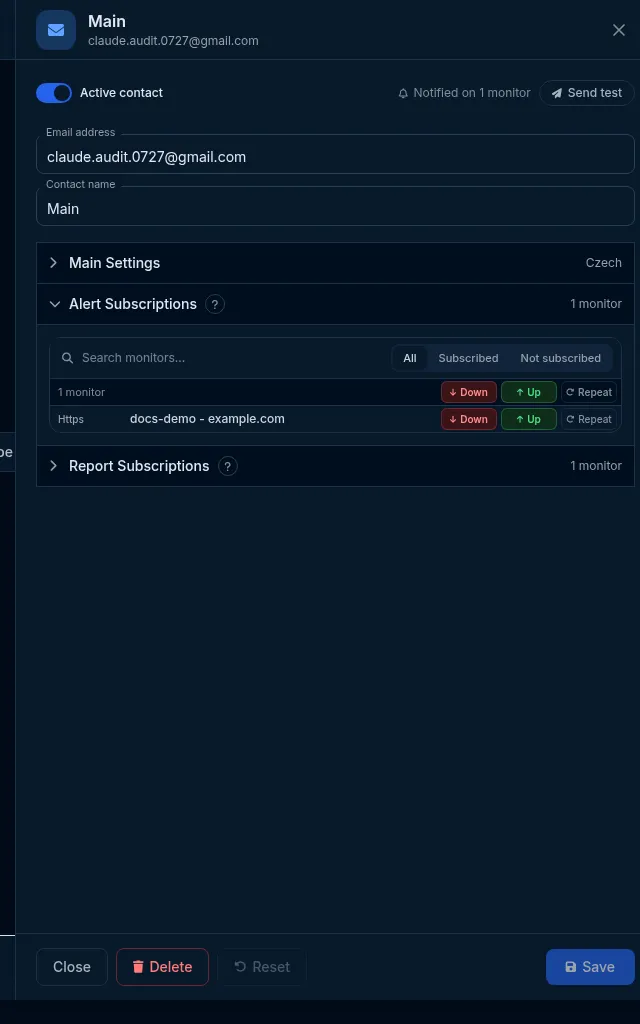
Section titled “Send a test in the app”- Open Alerts & Contacts and open the contact you want to check (its Subscriptions view, or the editor).
- Click Send test in the header.
- Confirm the Send test notification? prompt.
- Check the contact actually received it: your inbox, phone, chat app or webhook receiver.
Do it with the API or MCP
Section titled “Do it with the API or MCP”POST /contact/{id}/test{ "alertType": "down" }The body is optional - an empty request tests with up. The response reports how delivery actually went:
{ "contactId": "...", "alertType": "down", "outcome": "delivered", "origin": "core", "notificationId": "...", "externalId": null, "error": null, "exchange": { "request": "...", "response": "..." }}exchange carries the raw request/response HostTracker made to the channel (for example the webhook POST it
sent and the receiver’s HTTP response) - use it to diagnose a failure without needing separate access to logs.
origin tells you which path answered: core (the normal, real alert-sending pipeline) or api2-fallback
(used only when that pipeline is briefly unreachable - see below).
MCP: test_contact(id, alertType). This is a synchronous call, not a background job - the tool waits for the
real send attempt and reports the outcome directly (no polling).
What it proves, and what it doesn’t
Section titled “What it proves, and what it doesn’t”A successful test confirms the address is correct, the channel is wired up, and the message renders properly in your language. It does not exercise active hours or escalation delays - a test is sent immediately regardless of those settings, since the point is to check the contact itself, not the timing rules around it. It also doesn’t count against grouped alerts windows.
What happens next
Section titled “What happens next”The test is delivered (or fails) within the request itself - there’s nothing to poll. A test send does not create or touch any subscription, and it doesn’t affect the contact’s confirmation state either way.
Limits and gotchas
Section titled “Limits and gotchas”- The contact must already be confirmed and not overlimited - testing an unconfirmed contact is refused
(
422, reasonnot_confirmed), which is often the fastest way to notice a contact you forgot to confirm. - Rate-limited - repeated tests to the same contact in a short span are refused (
429 rate_limitedwithRetry-After); an SMS/voice test still costs real balance the same way a live alert would. - If the normal delivery pipeline is briefly unreachable, HostTracker automatically falls back to a direct,
local send for most types (
origin: "api2-fallback"in the response) - a webhook contact gets the raw diagnostic POST in that case, so its request/response is still meaningful. Key-addressed channels (PagerDuty, Opsgenie, Pushover, Pushbullet) never take the raw-webhook fallback path (their address is a key, not a URL)- they always route through the normal channel-specific sender.
- If a test fails:
- Email - check spam/junk, and confirm the contact isn’t still awaiting confirmation.
- Webhook / Slack / Teams / Mattermost - read the
exchangefield in the response, or check the receiving endpoint’s own logs; the test uses a distinct “this is a test” body, not the shape of a real Down/Up alert. - Key-addressed channels (PagerDuty, Opsgenie, Pushover, Pushbullet) - re-check the key or token was pasted correctly, with no extra whitespace or leftover URL scheme.