

Monitor network equipment over SNMP (SNMP monitor)
The SNMP monitor (API type snmp, shown in the app as SNMP check) asks a network device for one value by
its OID - uptime, an interface counter, a UPS battery level, a temperature - and records it on every check. Use it
for equipment that reports its health only through SNMP.
At a glance
Section titled “At a glance”| API type token | snmp |
| Runs from | HostTracker’s own internal check network - no location picker, no recheck |
| Intervals in the app | 1 minute to 24 hours, or a cron schedule |
| Default interval | 5 minutes in the app; 3 minutes if omitted in the API |
| Plan gates | the SNMP type is a package feature (snmp) |
How Down is decided
Section titled “How Down is decided”The check sends one Get (or GetNext) request for the OID. It goes Down when the device does not answer (timeout, unreachable host), answers with an SNMP error status, or rejects the credentials. When the device answers, the check is Up and the value is stored.
The monitor collects the raw value - the editor’s Response Validation summary reads raw value (no threshold). Threshold rules for SNMP values (Assertion rules) are shown in the editor as coming soon and are not evaluated yet. A single result is final; there is no multi-location recheck.
Settings reference
Section titled “Settings reference”The name, interval, cron, tags, Full Log, Open Stats and subscriptions work as described in
Common monitor fields. Do not send url or locations: the
display address is composed as host:port, oid, and locations.pools is refused.
| Setting (app label) | API field | Type / allowed values | Default | Plan limits | What it does for you |
|---|---|---|---|---|---|
| Host : Port (host) | settings.host |
host name or IP, 1-255 characters | required | - | The device to query. |
| Host : Port (port) | settings.port |
0-65535 | 161 | - | The SNMP port. |
| OID | settings.oid |
dotted numbers, at least two parts, for example 1.3.6.1.2.1.1.3.0 |
required | - | What to read. Symbolic names (MIB names) are not accepted. |
| SNMP version (Connection) | settings.version |
1 (v1), 2 (v2c), 3 (v3) |
app: 2; API: 1 | - | The protocol version your device speaks. |
| Community | settings.community |
up to 255 characters; secret | app: public |
- | The v1/v2c read community. Refused when version is 3. |
| SNMP command | settings.verb |
Get, GetNext |
Get in the app |
- | Get reads the OID; GetNext reads the next OID in the tree - useful when the exact index is unknown. |
| Security name (user) | settings.securityName |
1-255 characters | required for v3 | - | The SNMPv3 user. |
| Security level | settings.securityLevel |
noAuthNoPriv, authNoPriv, authPriv |
app: authPriv; required for v3 |
- | Whether v3 authenticates and encrypts. |
| Authentication | settings.authProtocol |
MD5, SHA (also SHA1, SHA-1, SHA256, SHA-256) |
app: SHA |
- | Required for authNoPriv and authPriv. |
| Authentication key (min. 8 characters) | settings.authKey |
8-255 characters; secret | - | - | Required with authentication. |
| Privacy (encryption) | settings.privProtocol |
DES, AES (also AES128, AES192, AES256 and dashed forms) |
app: AES |
- | Required for authPriv. |
| Privacy key (min. 8 characters) | settings.privKey |
8-255 characters; secret | - | - | Required for authPriv. |
Set it up in the app
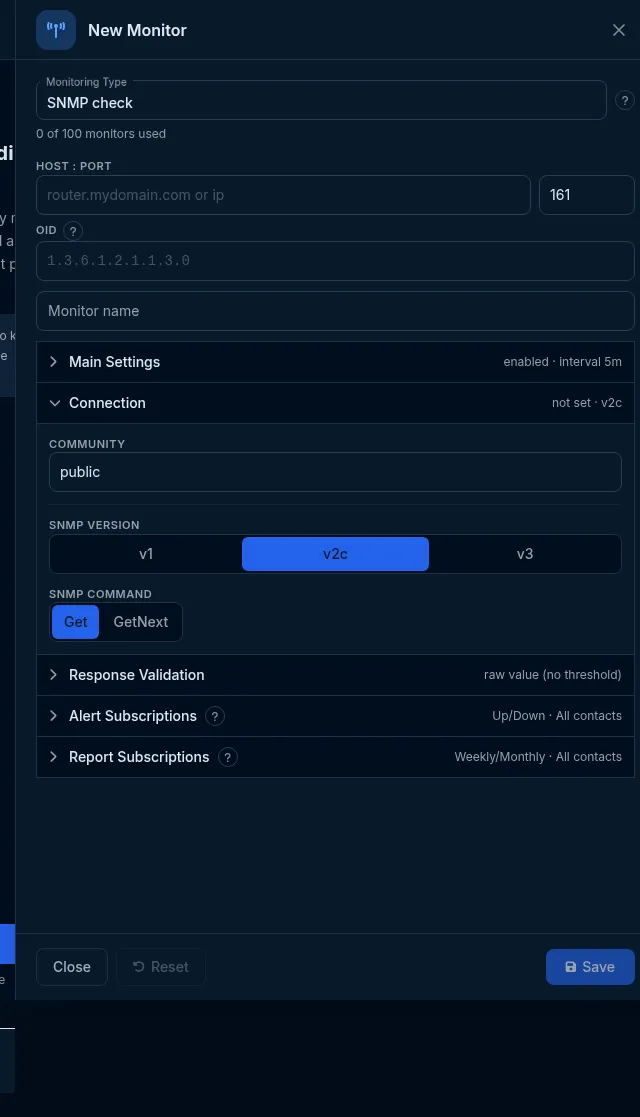
Section titled “Set it up in the app”- On the Sites dashboard, click Add Monitor and choose SNMP check in Monitoring Type.
- Enter Host : Port and the OID.
- In Connection, choose the SNMP version and enter the Community (v1/v2c) or the v3 security settings, and pick the SNMP command.
- Click Save.
Do it with the API or MCP
Section titled “Do it with the API or MCP”SNMP v2c:
curl -X POST https://api2.host-tracker.com/monitor \ -H "Authorization: Bearer $HT_TOKEN" -H "Content-Type: application/json" \ -d '{ "type": "snmp", "name": "Core switch uptime", "interval": 300, "settings": { "host": "switch.example.net", "oid": "1.3.6.1.2.1.1.3.0", "version": 2, "community": "<community>", "verb": "Get" } }'SNMP v3 with authentication and encryption - the settings object:
{ "host": "ups.example.net", "oid": "1.3.6.1.2.1.33.1.2.4.0", "version": 3, "securityName": "monitor", "securityLevel": "authPriv", "authProtocol": "SHA256", "authKey": "<auth-key>", "privProtocol": "AES", "privKey": "<priv-key>"}Update - read a different OID:
curl -X PATCH https://api2.host-tracker.com/monitor/<monitor-id> \ -H "Authorization: Bearer $HT_TOKEN" -H "Content-Type: application/json" \ -d '{ "settings": { "oid": "1.3.6.1.2.1.2.2.1.8.1" } }'MCP: create_monitor(type="snmp", name="Core switch uptime", interval=300, settingsJson="{...}") with no pools.
Recipes
Section titled “Recipes”- Is the device alive? -
sysUpTime1.3.6.1.2.1.1.3.0with Get; the check goes Down when the device stops answering. - Interface status -
ifOperStatusfor the port, for example1.3.6.1.2.1.2.2.1.8.<index>; watch the charted value. - Unknown index - use GetNext on the parent OID.
What happens next
Section titled “What happens next”Every check stores the returned value, so the monitor’s statistics show it over time. A device that stops answering turns the monitor Down at once and alerts the subscribed contacts.
Limits and gotchas
Section titled “Limits and gotchas”- Your device must accept SNMP from HostTracker’s internal check network (the source IPs are listed in the Database monitor’s editor).
422 invalid_settings- a symbolic OID,communitywith version 3, a v3 key shorter than 8 characters, or a v3 field missing for the chosen security level.422 validation_failedwithreason: pool_not_supported_for_type- omitlocations.- A value outside a range does not alert yet; only an unanswered or refused request does.