

Create a website (HTTPS) monitor
The Website / HTTPS monitor (API type http, shown in the app as Fast Check Https) requests your page
the way a visitor’s browser would, from many locations, and alerts you when it stops answering correctly. Use
it for any website, landing page or HTTP endpoint where “it answers with a normal page” is the thing to watch.
It is also the monitor the security sub-checks attach to (certificate expiry, domain expiry, DNSBL, Web Risk).
At a glance
Section titled “At a glance”| API type token | http |
| Runs from | HostTracker’s public checkpoint fleet - you pick the locations |
| Intervals in the app | 1, 2, 3, 5, 10, 15, 30, 45 minutes, 1, 2, 4, 6, 12, 24 hours, or a cron schedule |
| Default interval | 3 minutes (app and API) |
| Plan gates | none for the type itself; keywords, TLS policies, DNS options, cron and attached sub-checks are package features |
How Down is decided
Section titled “How Down is decided”One check passes when every stage succeeds, in this order:
- DNS resolves the host (with your DNS options, if set).
- The TCP connection opens and, for
https://, the TLS handshake completes. An expired certificate always fails the handshake; the four TLS policy switches below add stricter rules. - The server answers within the timeout with a status below 400. Redirects (3xx) are followed by default, up to 20 hops.
- Your status-code rules, keywords or assertion rules pass.
A failed check is not an alert yet. Other locations re-check it, and the monitor turns Down only when the recheck strategy confirms it (majority vote by default). See How down detection works.
Settings reference
Section titled “Settings reference”The editor has two fields at the top and six collapsible groups. The tables follow that order. API fields are
members of the POST /monitor / PATCH /monitor/{id} body; settings.* fields live inside the settings
object.
Common monitor fields
Section titled “Common monitor fields”These work the same way on every monitor type. Other type pages link here instead of repeating them.
| Setting (app label) | API field | Type / allowed values | Default | Plan limits | What it does for you |
|---|---|---|---|---|---|
| URL, domain, or IP | url |
string | required | blocked hosts are refused (url_blacklisted) |
The address to check. A bare domain is checked over http://. |
| Monitor name | name |
string, up to 255 characters | the URL | - | The label used in alerts, reports and widgets. |
| Monitoring enabled | enabled |
boolean | true |
enabling counts against your active monitor cap | Off keeps the configuration and history but runs no checks and sends no alerts. |
| Interval schedule / Interval | interval |
integer seconds; must be one of your account’s allowed values (GET /account -> limits.intervals) |
180 (3 min) | the package sets a minimum interval | How often the check runs. |
| Cron schedule | cronSchedule |
standard 5-field cron, UTC; null clears it |
none | cron is marked Available on paid plans | Runs on a calendar instead of an interval. See Cron scheduling. |
| Tags | tags (replace), addTags / removeTags (update only) |
array of strings | none | - | Group and filter monitors. See Tags. |
| Full Log | fullLog |
boolean | false |
not available when the package log-grouping floor is 1 hour or more | Stores every check result instead of grouping them. |
| Open Stats | openStat |
boolean | false |
- | Publishes the monitor’s statistics and log on a shareable public page. |
| (API only) SLA target | slaTarget |
number 0-100, null clears |
null |
- | The uptime percent reports measure this monitor against. |
Main Settings (type-specific)
Section titled “Main Settings (type-specific)”| Setting (app label) | API field | Type / allowed values | Default | Plan limits | What it does for you |
|---|---|---|---|---|---|
| Timeout | settings.timeout |
milliseconds, 50-100000 (the app slider: 1-100 s) | 40000 (40 s) | - | How long one request may take. A slower answer fails the check. DNS time is not counted. |
| Attached monitors - DNSBL | settings.attached.dnsbl |
true / false / {"enabled": bool} |
off | attached-check entitlement | Blacklist lookup of this host every 12 hours. |
| Attached monitors - Domain Expiration | settings.attached.domainExp |
same | off | attached-check entitlement | Warns 30, 7 and 1 day before the domain registration expires. |
| Attached monitors - Certificate Expiration | settings.attached.sslExp |
same | off | attached-check entitlement | Warns before the TLS certificate expires. |
| Attached monitors - Web Risk | settings.attached.webRisk |
same | off | Web Risk entitlement | Google Web Risk (phishing/malware) lookup every 12 hours. |
| Indexability (shown only when your package includes it) | settings.attached.indexability |
true / false or {enabled, metaRobots, robotsHeader, canonical} |
off; turning it on selects all three signals | Indexability entitlement | Reports when the page gains or loses noindex/nofollow or its canonical URL changes. At least one signal must stay on. |
The attached sub-checks are described on Attaching sub-checks to a monitor.
The API also accepts the same object at the top level as attached.
Request Configuration
Section titled “Request Configuration”| Setting (app label) | API field | Type / allowed values | Default | Plan limits | What it does for you |
|---|---|---|---|---|---|
| HTTP Method | settings.method |
H (HEAD), G (GET), P (POST), U (PUT), D (DELETE), A (PATCH) |
G |
- | GET downloads the page and is required for keyword checks. HEAD is the lightest availability check. |
| Request body | settings.body |
string, up to 2047 characters | empty | - | Sent with POST, PUT and PATCH. In Key-value mode the app builds form-urlencoded or JSON and sets Content-Type for you. |
| (API only) POST parameters | settings.postParameters |
form-encoded string, up to 2047 characters | empty | - | Legacy form body; prefer body plus a Content-Type header. |
| Immediate response / Follow redirects / Redirect is error | settings.followRedirect, settings.errorOnRedirect |
booleans | follow on, error off | - | Follow 3xx to the final page, stop at the first response, or fail on any 3xx. |
| Max redirects to follow | settings.maxRedirects |
1-20 | 20 | - | Hop budget while following redirects. Running out reports a redirect loop. |
| HTTP Headers | settings.headers |
array of {"name", "value"}; combined length up to 1023 characters |
none | - | Extra request headers, for example Authorization or User-Agent. Connection, Content-Length and Date are dropped. |
| Request authentication (Username, Password) | settings.username, settings.password, settings.authSchema |
strings up to 255; scheme Basic only |
none | - | HTTP Basic credentials. Send the password again to change it. |
| DNS Server Selection | settings.publicDns (integer, 0 = off) or settings.dns (up to 4 IPs) |
Default DNS servers at locations, Public DNS servers of location’s country, Manually defined DNS servers | default resolvers | public DNS and custom DNS are separate package features | Which resolvers look up your host. |
| Excluded public DNS server IPs (public DNS mode) | settings.expectedDns |
up to 10 IPs | none | public DNS feature | Public resolvers to skip. The API name is historical; the agent treats these as excluded. |
| Disable DNS cache | settings.dnsNoCache |
boolean | false |
- | Forces a fresh DNS lookup on every check. |
| (API only) User agent, Accept, Referer | settings.userAgent, settings.accept, settings.referer |
strings (255, 255, 1023) | HostTracker defaults | - | Older header shortcuts; the app now sets these as ordinary headers. |
Response Validation
Section titled “Response Validation”| Setting (app label) | API field | Type / allowed values | Default | Plan limits | What it does for you |
|---|---|---|---|---|---|
| HTTP Ok (the default summary) | - | - | on | - | Up means: resolved, connected, handshake done, status below 400. |
| Assertion mode | settings.assertMode + settings.assertsSource (rule text) or settings.asserts (rows) |
up to 20 rules; your package may allow fewer | off | assertion rule count and stateful rules are package features | Replaces the keyword and status fields with a rule list, for example status eq 200. See Assertions. |
| Ignore HTTP Errors | settings.ignoredStatuses |
up to 20 codes, 100-599 | none | - | These statuses count as success. |
| Error on these HTTP statuses | settings.errorStatuses |
up to 20 codes, 100-599 | none | - | These statuses always fail, even below 400. |
| Content check keywords | settings.keywords |
comma-separated, 255 characters in total; matched case-insensitively | none | keyword monitoring is a package feature | Words searched in the downloaded body. Needs GET. |
| Successful content check condition | settings.keywordMode |
PresentAny, PresentAll, ReverseAny, ReverseAll, ReverseWithResult |
PresentAny |
- | How keywords decide the verdict - see the table below. |
| TLS Handshake - Require valid SSL certificate chain | settings.requireValidChain |
boolean | false |
SSL policy feature | Also fails self-signed, untrusted-root and name-mismatched certificates. |
| Require strong TLS protocol (1.2 or higher) | settings.requireStrongTls |
boolean | false |
SSL policy feature | Fails servers that negotiate TLS 1.0/1.1 or SSL. |
| Block weak ciphers (128-bit or lower) | settings.blockWeakCiphers |
boolean | false |
SSL policy feature | Fails a weak negotiated cipher. |
| Check SSL certificate revocation | settings.checkRevocation |
boolean | false |
SSL policy plus revocation feature | Fails a revoked certificate (online CRL/OCSP). An unreachable responder does not fail the check. |
| Expected IPs Validation | settings.expectedIps |
up to 10 IPv4/IPv6 addresses | none | - | Fails when the host resolves to anything else - catches DNS hijacking and wrong records. |
| Max response size | settings.maxSize |
bytes; the API accepts 1024 and up, the agent reads at most 10 MB | 1048576 (1 MB) | - | Stops reading the body at this size; keywords and assertions judge only the downloaded part. |
| (API only) Certificate watch days | settings.certWatchDays |
up to 8 whole numbers, 1-3650 | none (the attached certificate check then uses 30, 7, 1) | - | Days before expiry on which an expiry reminder is sent. |
| Russian BL check (a separate item in the type list) | settings.preset: "bl:ru" |
bl:ru |
- | - | A fixed Http check from Russian locations that goes Down when the regulator’s block page appears. Sent alone - no other settings. |
The HTTP Policies picker in Response Validation has no API member yet.
How Successful content check condition actually decides (keywords are split on commas, case-insensitive):
| App option | keywordMode |
The check fails when |
|---|---|---|
| ANY keyword must be present | PresentAny |
none of the keywords is found |
| ALL keywords must be present | PresentAll |
at least one keyword is missing |
| ANY keyword must be absent | ReverseAny |
any keyword is found |
| ALL keywords must be absent | ReverseAll |
every keyword is found at the same time |
| ALL keywords absent (fail shows location) | ReverseWithResult |
any keyword is found in the first 10,000 characters; the error quotes the matching text |
Alert and Report Subscriptions
Section titled “Alert and Report Subscriptions”| Setting (app label) | API field | Default | What it does for you |
|---|---|---|---|
| Alert Subscriptions | alertSubscriptions (create only): [{"contactIds": [...], "alertTypes": ["down", "up", "repeatedlyDown"]}] |
app: All contacts, Up/Down; API: none | Who is told about Down, Up and still-down reminders. |
| Report Subscriptions | reportSubscriptions (create only): [{"contactIds": [...], "frequency": "weekly"}] |
app: Weekly/Monthly to all contacts; API: none | Scheduled uptime reports. Frequencies: daily, weekly, monthly, quarterly, yearly. |
After creation, change subscriptions with PUT /monitor/{monitorId}/alert/{contactId} - see
Subscribe monitors to a contact.
Monitoring Locations
Section titled “Monitoring Locations”| Setting (app label) | API field | Type / allowed values | Default | What it does for you |
|---|---|---|---|---|
| Location tree | locations.pools |
pool ids from GET /agent/pool; at least one; "allworld" = everywhere |
required on create; the app pre-fills your default locations | Where checks run. The selection needs at least 7 live checkpoints (insufficient_agents). |
| Recheck strategy | recheck.strategy, recheck.minNumDown |
"" (majority, default), minNumDown, noRecheck, fullAgreement, downFullAgreement; minNumDown 1-10 (app 1-7) |
majority vote | How a failure is confirmed. |
| If selected locations are unavailable | locations.fallback |
starve, geo, world |
starve (Selected locations only) |
Wait for your locations, use the closest ones, or use any location. |
| (API only) excluded checkpoints | locations.excludedAgents |
agent ids | none | Keeps specific checkpoints out even inside a chosen pool. |
Set it up in the app
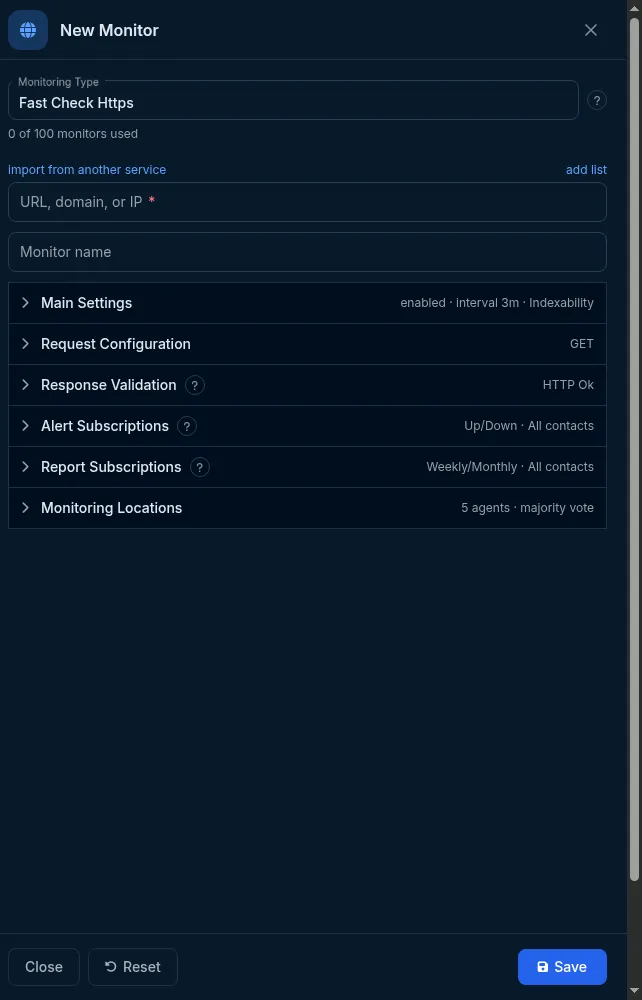
Section titled “Set it up in the app”- On the Sites dashboard, click Add Monitor. Fast Check Https is selected in Monitoring Type.
- Enter the URL, domain, or IP and, optionally, a Monitor name.
- Open Main Settings: choose the interval (or Cron schedule), adjust Timeout, add Tags, and switch on any Attached monitors.
- Open Request Configuration only if you need a method other than GET, a body, headers, credentials or DNS options.
- Open Response Validation to add keywords, status-code rules, assertion rules, TLS policies or expected IPs.
- Check Alert Subscriptions - by default all contacts get Up and Down.
- In Monitoring Locations, keep All world or pick regions.
- Click Save.
Do it with the API or MCP
Section titled “Do it with the API or MCP”Base URL https://api2.host-tracker.com, header Authorization: Bearer <token> (create tokens at
Integrations -> API, /integrations/api). Scope monitor:write.
Minimal create:
curl -X POST https://api2.host-tracker.com/monitor \ -H "Authorization: Bearer $HT_TOKEN" -H "Content-Type: application/json" \ -d '{ "type": "http", "url": "https://example.com", "interval": 60, "locations": { "pools": ["allworld"] } }'The answer is 201 with the whole monitor. Add ?dryRun=true to validate without creating.
A create with a keyword, a strict TLS rule, a certificate-expiry sub-check and alerts to an existing contact:
{ "type": "http", "url": "https://shop.example.com/health", "name": "Shop health", "interval": 300, "locations": { "pools": ["allworld"] }, "settings": { "keywords": "ok", "keywordMode": "PresentAny", "requireValidChain": true, "attached": { "sslExp": true } }, "alertSubscriptions": [ { "contactIds": ["<contact-id>"], "alertTypes": ["down", "up"] } ]}Update - only the members you send change (null clears a clearable field):
curl -X PATCH https://api2.host-tracker.com/monitor/<monitor-id> \ -H "Authorization: Bearer $HT_TOKEN" -H "Content-Type: application/json" \ -d '{ "interval": 120, "settings": { "timeout": 15000, "errorStatuses": [302] } }'MCP: create_monitor and update_monitor. Pass settings as a JSON string. The MCP interval argument is sent
to the API unchanged, so give it in seconds:
create_monitor(type="http", url="https://example.com", interval=300, pools="allworld", settingsJson="{\"keywords\":\"ok\"}")update_monitor(id="<monitor-id>", settingsJson="{\"timeout\":15000}")create_monitor has no arguments for recheck, fallback, cron or subscriptions. Use subscribe_contact for
alerts, or api_request with the full JSON body. The complete field schema is at
GET /monitor/type/http.
Recipes
Section titled “Recipes”- A keyword must be on the page -
settings.keywords: "Add to cart",keywordMode: "PresentAny", method GET. - Fail on an error word -
keywords: "error,exception",keywordMode: "ReverseAny". - Only 200 is healthy -
errorStatuses: [201, 202, 204, 301, 302], or turn on assertion mode withstatus eq 200. - An endpoint that answers 401 when healthy -
ignoredStatuses: [401]. - A page that must never redirect - Redirect is error (
errorOnRedirect: true). - Authenticated health check -
headers: [{"name": "Authorization", "value": "Bearer ..."}]orusername/passwordfor Basic auth. - POST a JSON body -
method: "P",body: "{\"ping\":1}", headerContent-Type: application/json. - Catch a certificate problem early -
requireValidChain: trueplus the Certificate Expiration attach. - Catch DNS hijacking -
expectedIps: ["203.0.113.10"].
What happens next
Section titled “What happens next”The first check runs shortly after you save - at most one interval later - from the chosen locations, and the dashboard shows the result. A failure triggers rechecks from other locations; a confirmed failure opens an incident and alerts the subscribed contacts. A monitor created through the API alerts nobody until you add subscriptions.
Limits and gotchas
Section titled “Limits and gotchas”422 invalid_interval- the interval is not in your account’s allowed list (allowed[]names them);403 package_interval_conflict/403 package_limit- the package does not allow it.422 invalid_settings- an unknown or out-of-range settings member;422 validation_failedwithreason: unknown_member- an unknown top-level member.422 unknown_pool/insufficient_agents- a pool id is wrong, or the selection has too few live checkpoints.409 duplicate_monitor- an identical monitor already exists.422 type_immutable- the type cannot change after creation.assertModerefuseskeywords,keywordMode,ignoredStatuses,errorStatuses,errorOnRedirectandpresetin the same monitor.assertsSourceandassertsare mutually exclusive.presetmust be sent alone.- The app lists OPTIONS as a method, but the API accepts only the six methods above.
- The app’s Max response size slider allows 0; the API minimum is 1024 bytes.