

Monitor reachability with ping (Ping monitor)
The Ping monitor (API type ping, shown in the app as Ping check) sends ICMP echo requests to a host and
confirms it answers. Use it for servers, routers, VPN gateways, cameras and any device with an IP address that
does not run a web server. If the target is a website, prefer the Website monitor:
many hosts and most CDNs block ICMP while serving pages perfectly well.
At a glance
Section titled “At a glance”| API type token | ping |
| Runs from | HostTracker’s public checkpoint fleet, only on checkpoints that can send ICMP - you pick the locations |
| Intervals in the app | 1 minute to 24 hours, or a cron schedule |
| Default interval | 3 minutes |
| Plan gates | none for the type; public/custom DNS and the attached DNSBL are package features |
How Down is decided
Section titled “How Down is decided”Each check resolves the host (unless it is an IP address) and sends 4 ICMP echo requests, each waiting up to 1 second for a reply. The check succeeds when at least one reply comes back. If the first resolved address does not answer, up to 2 more addresses from DNS are tried before the check fails. With Expected IPs Validation on, resolving to an address outside your list also fails the check.
A failure is re-checked from other locations, and the monitor turns Down only when the recheck strategy confirms it. See How down detection works.
Settings reference
Section titled “Settings reference”The name, interval, cron, tags, Full Log, Open Stats, subscriptions and locations work as described in Common monitor fields. Ping has no timeout or packet-count setting - the 4 echoes and 1-second wait are fixed.
| Setting (app label) | API field | Type / allowed values | Default | Plan limits | What it does for you |
|---|---|---|---|---|---|
| Url / Domain / IP | url |
host name or IPv4/IPv6 address | required | - | What to ping. A URL is reduced to its host. |
| Attached monitors - DNSBL | settings.attached.dnsbl |
true / false / {"enabled": bool} |
off | attached-check entitlement | Blacklist lookup of this host every 12 hours. The only sub-check a Ping monitor can carry. |
| DNS Server Selection (Request Configuration) | settings.publicDns (integer, 0 = off) or settings.dns (up to 4 resolver IPs) |
Default DNS servers at locations, Public DNS servers of location’s country, Manually defined DNS servers | default resolvers | public DNS and custom DNS are separate package features | Which resolvers turn the host name into an address. Custom DNS helps with split-horizon setups. |
| Excluded public DNS server IPs | settings.expectedDns |
up to 10 IPs | none | public DNS feature | Public resolvers to skip. The API name is historical; the agent treats these as excluded. |
| Expected IPs Validation (Response Validation) | settings.expectedIps |
up to 10 IPv4/IPv6 addresses; Resolve IPs automatically fills the current ones | none | - | Fails the check when the host resolves to any other address. |
| Recheck strategy | recheck.strategy, recheck.minNumDown |
as on the Website monitor | majority vote | - | How a failure is confirmed. |
| If selected locations are unavailable | locations.fallback |
starve, geo, world |
starve |
- | What happens when your chosen checkpoints are all busy. |
The Response Validation summary shows Any reply when no expected IPs are set.
Set it up in the app
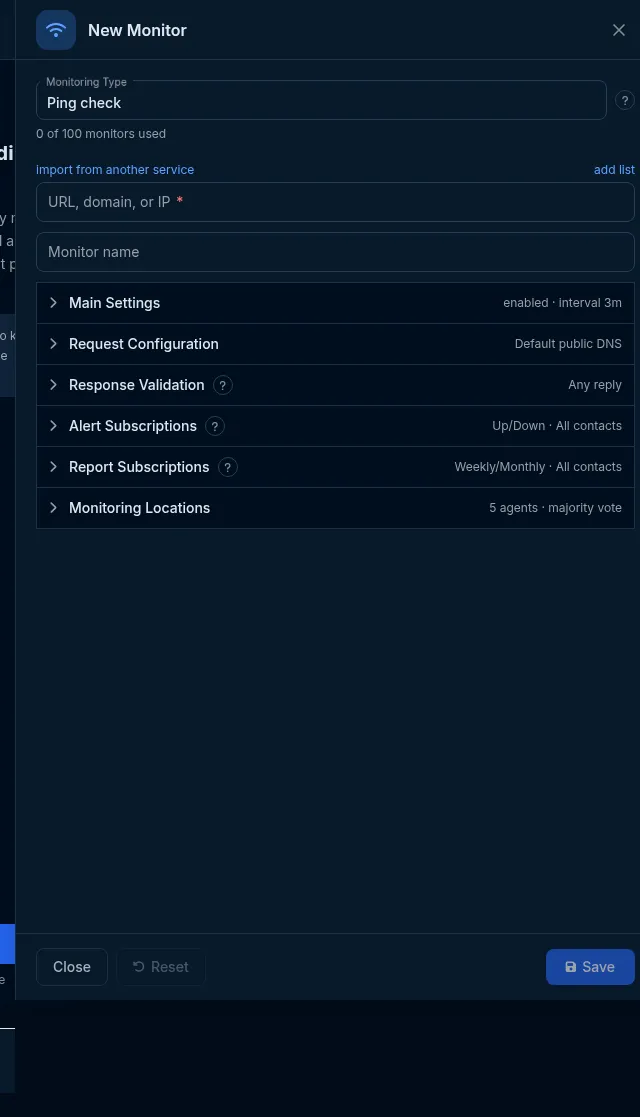
Section titled “Set it up in the app”- On the Sites dashboard, click Add Monitor and choose Ping check in Monitoring Type.
- Enter the host or IP in Url / Domain / IP and a name.
- In Main Settings, choose the interval and, if you want, switch on the DNSBL attached monitor.
- Optionally set DNS Server Selection (Request Configuration) and Expected IPs Validation (Response Validation).
- Pick locations in Monitoring Locations and click Save.
Do it with the API or MCP
Section titled “Do it with the API or MCP”curl -X POST https://api2.host-tracker.com/monitor \ -H "Authorization: Bearer $HT_TOKEN" -H "Content-Type: application/json" \ -d '{ "type": "ping", "url": "203.0.113.10", "name": "Edge router", "interval": 60, "locations": { "pools": ["allworld"] } }'Update - pin the expected address and attach a blacklist check:
curl -X PATCH https://api2.host-tracker.com/monitor/<monitor-id> \ -H "Authorization: Bearer $HT_TOKEN" -H "Content-Type: application/json" \ -d '{ "settings": { "expectedIps": ["203.0.113.10"], "attached": { "dnsbl": true } } }'MCP (interval is passed to the API as-is, in seconds):
create_monitor(type="ping", url="203.0.113.10", name="Edge router", interval=60, pools="allworld")update_monitor(id="<monitor-id>", settingsJson="{\"expectedIps\":[\"203.0.113.10\"]}")Recipes
Section titled “Recipes”- A server behind a firewall that drops ICMP - use a Port monitor on an open service port instead.
- A host with several A records - add all of them to Expected IPs Validation so a change of record alerts you.
- Mail server reputation - attach DNSBL to the mail host’s Ping monitor.
What happens next
Section titled “What happens next”The monitor records the round-trip time of each check; the dashboard charts it. When all 4 echoes fail at a location, other locations re-check before an incident opens and contacts are alerted.
Limits and gotchas
Section titled “Limits and gotchas”- A host that blocks ICMP shows Down even when its services work. Test with an instant check first.
- Only checkpoints that can send ICMP take Ping checks, so a small region may not reach the 7 live checkpoints a
selection needs (
422 insufficient_agents). locations.poolsis required when creating a Ping monitor through the API; send["allworld"]for everywhere.422 invalid_interval,unknown_poolandinvalid_settingsbehave as on the Website monitor.