

Monitor a database (Database monitor)
The Database monitor (API type database, shown in the app as Database check) connects to your database
server, logs in, optionally runs a query and compares the result with a threshold. It proves the database itself
is reachable and answering, independent of the application in front of it. Supported engines: SQL Server,
Oracle, MySQL, PostgreSQL and Firebird.
At a glance
Section titled “At a glance”| API type token | database |
| Runs from | HostTracker’s own internal check network - no location picker, no recheck |
| Source IPs to allow | 4.207.101.172 and 20.107.152.200 (North Europe), as shown in the editor |
| Intervals in the app | 10, 15, 30, 45 minutes, 1, 2, 4, 6, 12, 24 hours, or a cron schedule |
| Default interval | 10 minutes; the type’s minimum is 10 minutes |
| Plan gates | the Database type is a package feature (db) |
How Down is decided
Section titled “How Down is decided”- The check connects with a 10-second connect timeout. With Retry on connect fail on, a failed connection is tried once more.
- The server must accept the login.
- If a Query is set, it must run without error (retried once with Retry query on error). The whole check has about 30 seconds.
- If Result verification is set, the value (or row count) must pass the comparison.
The check runs from one internal checkpoint and a single result is final - there is no multi-location recheck.
Settings reference
Section titled “Settings reference”The name, interval, cron, tags, Full Log, Open Stats and subscriptions work as described in
Common monitor fields. Do not send url or locations: the
monitor’s display address is composed from the connection fields, and sending locations.pools is refused.
| Setting (app label) | API field | Type / allowed values | Default | Plan limits | What it does for you |
|---|---|---|---|---|---|
| Server type | settings.serverType |
mssql, oracle, mysql, postgresql, firebird |
mssql |
- | The engine; it also sets the default port. |
| Server : Port (server) | settings.server |
host name or IP, 1-100 characters; no spaces or ; , " : ' ( ) = |
required | - | The database host. Put the port in its own field. |
| Server : Port (port) | settings.port |
1-65535 | engine default: 1433, 1521, 3306, 5432 or 3050 | - | The listener port. |
| Database | settings.database |
up to 100 characters | empty | - | The database name. For Oracle this is the Instance name (SID) and must be a plain identifier. |
| Service (Oracle only) | settings.service |
up to 100 characters, plain identifier | empty | - | The Oracle service name (not the SID). Set this, the SID, or both. |
| DB user name | settings.login |
up to 100 characters | empty | - | Leave blank for trust/anonymous connections the server allows. |
| DB user password | settings.password |
up to 100 characters; write-only for view-only users | empty | - | Send it again to change it. |
| Retry on connect fail (Connection) | settings.retrying |
boolean | app: on; API: false |
- | Tries the connection once more before failing. |
| Query | settings.query |
SQL, up to 500 characters | empty = connection test only | - | Any statement your account may run - a SELECT, or UPDATE/DELETE/INSERT. |
| Query result | settings.mode |
Scalar (Scalar value - first column of the first row) or NonQuery (Row count - rows affected) |
Scalar in the app |
- | What value the comparison uses. |
| Result verification | settings.comparisonMode |
No (No verification), Equal (Equal to), NotEqual (Not equal to), GreaterThan, LessThan, InInterval (In range), OutInterval (Out of range) |
No |
- | The check goes Down when the value fails this comparison. |
| Expected value / Forbidden value / limits | settings.value1, settings.value2 |
numbers; value2 only for the range modes |
none | - | The comparison operands (Bottom limit, Top limit for ranges). |
| incl. / excl. | settings.includeValue1, settings.includeValue2 |
booleans | false (exclusive) |
- | Makes a bound inclusive: GreaterThan with includeValue1 means “at least”. |
| Retry query on error | settings.retryingCmd |
boolean | app: on; API: false |
- | Runs a failed query once more before failing. |
Set it up in the app
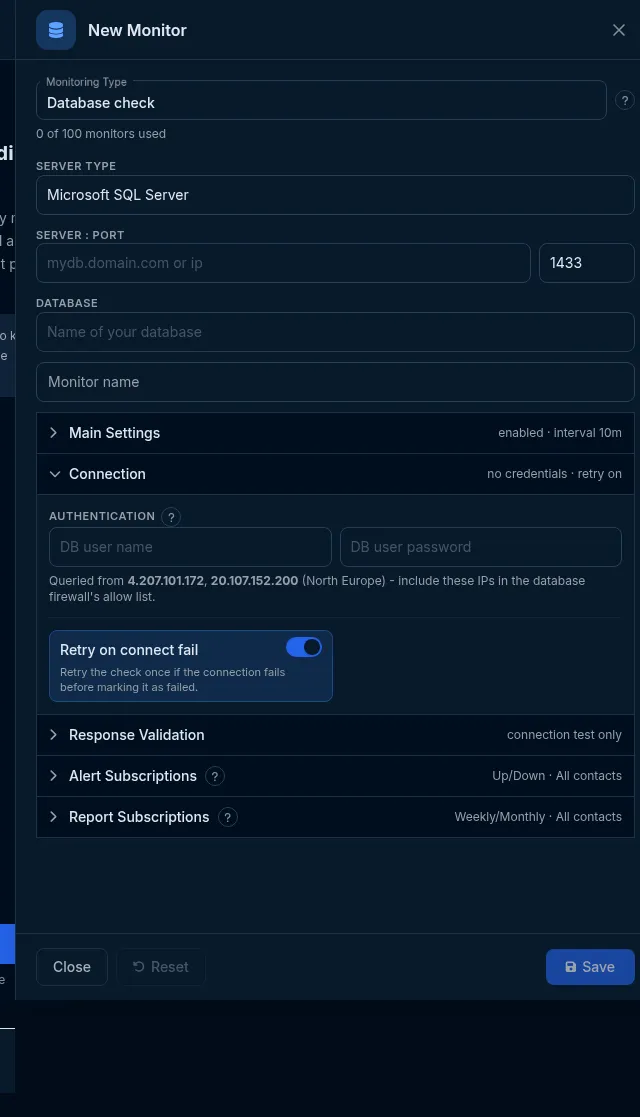
Section titled “Set it up in the app”- On the Sites dashboard, click Add Monitor and choose Database check in Monitoring Type.
- Choose the Server type, enter Server : Port and the Database (and Service / Instance name (SID) for Oracle).
- In Connection, enter DB user name and DB user password, and allow the two listed source IPs in your database firewall.
- In Response Validation, optionally type a Query, choose Query result and Result verification with its value.
- Click Save.
Do it with the API or MCP
Section titled “Do it with the API or MCP”curl -X POST https://api2.host-tracker.com/monitor \ -H "Authorization: Bearer $HT_TOKEN" -H "Content-Type: application/json" \ -d '{ "type": "database", "name": "Orders DB", "interval": 600, "settings": { "serverType": "postgresql", "server": "db.example.com", "port": 5432, "database": "shop", "login": "monitor", "password": "<password>", "query": "SELECT count(*) FROM orders WHERE status = 1", "mode": "Scalar", "comparisonMode": "GreaterThan", "value1": 0, "retrying": true } }'Update - alert only when the backlog passes 1000 rows:
curl -X PATCH https://api2.host-tracker.com/monitor/<monitor-id> \ -H "Authorization: Bearer $HT_TOKEN" -H "Content-Type: application/json" \ -d '{ "settings": { "query": "SELECT count(*) FROM queue", "comparisonMode": "LessThan", "value1": 1000 } }'MCP (interval in seconds; no pools):
create_monitor(type="database", name="Orders DB", interval=600, settingsJson="{\"serverType\":\"mysql\",\"server\":\"db.example.com\",\"login\":\"monitor\",\"password\":\"<password>\"}")Recipes
Section titled “Recipes”- Is it up and accepting my login? - no query, No verification.
- Replication is fresh - a query returning seconds of lag,
LessThan60. - Orders are flowing - count of recent rows,
GreaterThan0. - A value stays in a band -
InIntervalwithvalue1/value2and the incl. switches.
What happens next
Section titled “What happens next”Each check records the connect, login and query timings and the returned value, which the monitor’s statistics chart over time. A failed check concludes at once (no recheck) and alerts the subscribed contacts.
Limits and gotchas
Section titled “Limits and gotchas”- Omitting
intervalon create uses 180 seconds, which is below this type’s 10-minute minimum and is refused. Send 600 or more. 422 validation_failedwithreason: pool_not_supported_for_type- you sentlocations.pools; omitlocations.422 invalid_settings- a colon or other forbidden character inserver(useport), an Oracle name that is not a plain identifier, or a comparison without its value.409 duplicate_monitor- an identical database monitor (same connection and query) already exists.403 package_limit- your package does not include Database monitors.- Use a read-only database user unless your query must write.